The SOOT Module System: A Complete Guide
Table of Contents
- The SOOT Module System: A Complete Guide
Part 1: How Names Work in SOOT
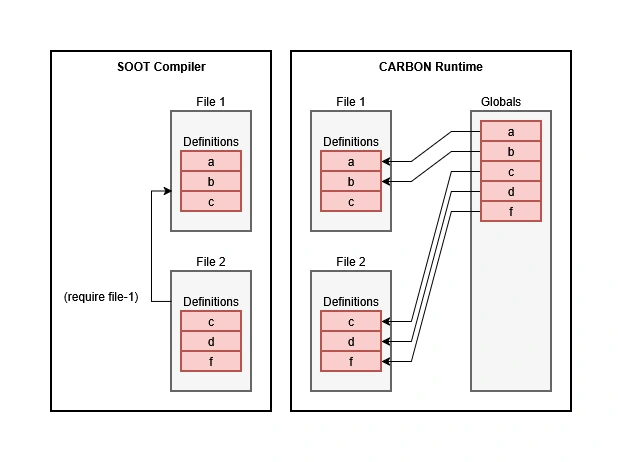
In SOOT, it is important to distinguish two things: how the compiler finds definitions, and how the runtime stores their values.
1. Definitions in Files
Each .sc file is a separate module. Within a single file, you cannot declare the same name twice:
(defun greet () "hello")
(defun greet () "hi") ; error
To change a function, you must edit its definition, not add a second one.
At the same time, different files may define the same names.
2. How the Compiler Finds Definitions
When a file includes another one via (require "b.sc"), the compiler gains access to its definitions.
If several files define greet, that is not an error: each definition is tied to its own file. When resolving a name, the compiler first checks the current file, then the files it requires (recursively along the require graph).
Thus, identical names in different files can exist independently at the compilation level. The compiler does not merge them into a single table.
3. What Happens at Runtime
When a module is loaded, its global names are registered in the shared Globals table.
In this table, each name has exactly one current value. If several modules define greet, the last load replaces the previous value.
For example, bar.sc defines greet as "hello", and baz.sc defines it as "hi".
- If
baris loaded first and thenbaz,Globalswill contain"hi". - If
bazis loaded first and thenbar,Globalswill contain"hello".
This rule applies to the runtime. It does not mean that the compiler mixes definitions from different files.
4. What Happens in the REPL
The REPL is an interactive console. Code entered there is treated by the compiler as a separate virtual file, such as <repl> or <repl-N>.
Therefore, defining greet in the REPL does not remove the definition from bar.sc in the compiler’s tables. But once the new definition is loaded, its value may replace the previous one in the shared Globals table.
5. Summary
- File: contains its own definitions; redeclaring a name within a file is forbidden.
- Compiler: distinguishes definitions from different files and resolves names according to visibility rules.
- Runtime: stores one current value for each global name; the last load may replace it.
- REPL: creates separate definitions that, when loaded, may change values in the runtime.
Part 2: Using the Command Line
Compiling a Single File
sootc --no-repl --target build soot_src/tests/bar.sc
What happens:
- The compiler reads
soot_src/tests/bar.sc. - It builds an AST for it (
FileNodenamedbar). - It generates
build/bar.binandbuild/bar.h. - It exits because of
--no-repl.
--target build is the directory where results are written. If it does not exist, it is created. If omitted, build is used by default.
What is inside bar.bin:
bar-greet— the compiled function.top-level— if the file contains top-level expressions (for example, a bare(bar-greet)not wrapped in adefun). If the file contains only declarations, there is notop-level: on load the module does nothing except register names.
Compiling a File with Dependencies
sootc --no-repl --target build soot_src/tests/foo.sc
foo.sc contains:
(require "bar.sc")

(defun foo-greet () (bar-greet))

(foo-greet)
What happens:
- The compiler reads
foo.sc. - It sees
(require "bar.sc"). - It looks for
bar.sc: first next tofoo.sc(soot_src/tests/bar.sc), then inPROJECT, then insearch_paths. - It finds it, compiles
bar.scas a separate module in memory, and registers it in the runtime. - It continues compiling
foo.sc:foo-greetnow seesbar-greetthrough the import graph. - It generates
build/foo.bin, which records: “this module requiresbar”.
build/bar.bin is not written to disk at this point: require compiles bar.sc in memory, but only a separate sootc bar.sc run or (save-module "bar.sc") from the REPL creates the .bin.
Compiling with SIDBase
sootc --no-repl --target build --sidbase build/sidbase.bin soot_src/tests/foo.sc
SIDBase is a file that maps 64-bit hashes (SIDs) back to their strings. Inside .bin, all names are stored as SIDs (0xF9E6E6EF197C2B25), not as strings — this is more compact and faster. But without SIDBase, the disassembler and inspector show <unknown:0x...> instead of bar-greet.
Why --sidbase:
- It is loaded at the start of compilation, so that every string encountered in
lib.sc,lib.st, and your own files ends up in SIDBase. - It is saved at the end, so that the disassembler can recover names.
If --sidbase is not given:
- SIDBase is not loaded (stays empty).
- SIDBase is not saved.
- This is fine for one-off compilations, but
list-symbols,inspect, andsc-runin the REPL will show<unknown:...>.
Recommendation: always pass --sidbase build/sidbase.bin. One file, accumulating names between runs.
Starting the REPL with a Runtime
sootc --repl --runtime local --sidbase build/sidbase.bin
--repl— open an interactive session.--runtime local— use the in-process VM (Carbon). Alternatives:--runtime null(execute nothing) or--runtime host:port(remote host).--sidbase— load SIDBase so that names resolve.
In the REPL you can:
- Compile forms (
(defun f () ...)). - Load modules (
(load-module "./build/foo")). - Call functions (
(sc-run foo-greet)). - Save the session (
(save-session "mysession")). - Save modules (
(save-module "soot_src/tests/bar.sc")).
Part 3: Using the Interactive Session
The compiler can be started with an interactive REPL session.
$ sootc --repl
The window that opens can be used for incremental compilation. To do so, type an expression and press Enter.
What Happens When You Type a Form
For example, the user types into the REPL:
sci> (defun bar-greet () (print "hello"))
The following happens:
- The reader parses the string into a SOOT object.
- The REPL dispatcher checks: is this a REPL command (from
repl_commands()) or an ordinary form?defunis not a command, so it continues. - The compiler compiles the form as a separate module named
<repl-N>(N increments with each input). - The runtime loads the module
<repl-N>:bar-greetis added toGlobals. - The runtime runs the module’s
top-levelsection (if any). - The form is stored in
m_session_forms— the session history.
Key point: each REPL input is a separate module <repl-0>, <repl-1>, and so on. This is done so that redefining a name in a later input does not shadow the previous one in the compiler. In the runtime, Globals is a single table, and the last load wins there.
The Problem of Faulty Input
If you type an incorrect defun or any other invalid expression, compilation fails, and the compiler state rolls back to its previous state:
sci> (defun bar-greet (lambda () "wrong"))
; ERROR: FunctionCompiler::parse_arguments ...
This form does not go into m_session_forms — it is not part of the session. Only successfully compiled forms are recorded. That is why (save-session ...) will not fail on earlier errors.
Compiling a Dependency Request
sci> (require "bar.sc")
This is a language form, not a REPL command. It is processed during compilation:
- The compiler looks for
bar.sc(next to the current file, thenPROJECT, thensearch_paths). - It compiles
bar.scas a separate module (FileNode("bar")). - It registers the module in the runtime.
- It adds
bar.scto the import graph of the current file (<repl-N>).
Result: bar-greet is visible to the compiler in the current form via FileNode::lookup, which walks the import graph recursively.
Loading a Module into the Runtime
sci> (load-module "./build/foo")
load-module is an ordinary function call that performs loading at program run time. It is not a compiler command and not a REPL dispatcher command. It:
- Looks for
foo.bin(first as-is, then inPROJECT, then insearch_paths). - Loads it into
Globals. - Recursively reads
requires: ["bar"]and loadsbar.bin. - Runs the
top-levelsection offoo.bin(if any).
The key difference between require and load-module:
require "bar.sc"— compilesbar.sc, registers it in the runtime, and adds an import edge to the graph.load-module "./build/bar"— loads the already-compiledbar.bininto the runtime; it does not compile and does not add an import edge.
What follows from this: after (load-module "bar") you can call (sc-run bar-greet), but you cannot write (bar-greet) — the compiler does not know about bar-greet, because bar.bin did not go through require.
Saving the Console History
sci> (save-session "mysession")
What is saved:
- Every form you entered in the console that compiled successfully.
- Not saved: failed forms, runtime commands (
(e),(reload),(gc)), forms originating fromrequire.
What is not saved:
- Modules loaded via
load-module. They are not inm_session_forms. requiresfrom the console, if they were added only viaload-module.
So mysession.bin saves the forms entered in the console, not copies of every module the console loaded. If the saved session should have a compile-time dependency on the source module foo, use require. load-module loads the finished binary module at run time but does not create such a compiler dependency.
Self-dependency: if you save a session as "bar" and the console had (require "bar.sc"), bar is removed from requires — otherwise bar.bin would require itself and could not be loaded.
Saving a Module
sci> (save-module "soot_src/tests/bar.sc")
What is saved:
- The contents of the file
bar.sc: itsdefun, itsrequire, itstop-level. - But not what you entered in the console.
When it is useful: when you have edited a .sc file and want to compile exactly that file without leaving the REPL, or when you are working with several files and want to rebuild one of them.
There is also (save-module-recursive "src/main") — it saves the module and every module it requires, in the correct order (dependencies first). One call — the whole dependency graph on disk.
Self-dependency: save-module "bar.sc" removes bar from requires — if bar.sc contains (require "bar.sc"), that is discarded.
The Difference Between save-session and save-module
save-session "x" |
save-module "x.sc" |
|
|---|---|---|
| What is saved | forms entered in the console | the contents of the file x.sc |
requires |
from require in the console |
from require in the file |
top-level |
every form from the console | the top-level from the file |
| Self-dependency | removed | removed |
| When to use it | “save what I have built up” | “rebuild a file without leaving the REPL” |
Part 4: Loading a Module
sci> (load-module "./build/foo")
hello from bar
; => null
What happens:
load-modulelooks forfoo.bin(first as-is, thenPROJECT/foo.bin, thenPROJECT/search_path/foo.bin).- It loads
foo.binintoGlobals:foo-greet— registered.top-level— not registered (it is the module’s entry point, not a symbol).requires— not registered (it is metadata).
- It reads
requires: ["bar"]. - It recursively loads
bar.bin:bar-greet— registered.
- It runs the
top-levelsection offoo.bin:(foo-greet)→(bar-greet)→print "hello from bar". - It prints
hello from bar.
; => null — top-level returns nothing, which is normal.
Part 5: Calling a Function
sci> (sc-run foo-greet)
hello from bar
; foo-greet => 1
sc-run is a REPL command. It:
- Looks up the name
foo-greetinGlobals. - Finds the
ScriptLambda*. - Calls it through the VM.
- Prints the result (
1— becauseprintreturns1).
The difference between (sc-run foo-greet) and (foo-greet):
(sc-run foo-greet)— runtime; works becausefoo-greetis inGlobals.(foo-greet)— compiler; fails with'foo-greet' not visible from the current file, becausefoo.scis not in the import graph of the current<repl-N>(unlessfoo.scwas required from the console).
If you want (foo-greet) to work:
sci> (require "foo.sc") ; ← not load-module!
require compiles foo.sc and adds foo.sc to the import graph of the current <repl-N>. After that (foo-greet) compiles and runs.
Part 6: Finding Project Files
Project Root
PROJECT is the project root. It is determined in the following order:
--project-root <dir>(or the alias--project <dir>);- the environment variable
SOOT_ROOT; - the
project_rootfield insoot.json(a path relative to the directory containingsoot.json); - the directory that contains the found
soot.json; - the current working directory.
The project_root field in soot.json lets you place the config file anywhere and point to the real root relative to it. Without the field, the directory containing soot.json is the root. Example:
{
  "project_root": "..",
  "runtime": "local",
  "sidbase": "build/sidbase.bin",
  "search_paths": ["lib", "src", "examples"]
}
Here PROJECT is the directory one level above soot.json, and sidbase and search_paths are resolved relative to that PROJECT.
Directories
PROJECT— project root (see above).build/— default output directory (--target build).soot_src/— sourceslib.st,lib.sc(prelude).
Files
*.sc— source.*.bin— compiled module.*.h— C header describing types (for external tools).sidbase.bin— SIDBase.
Search Paths
When looking for require and load-module, the following are checked:
- Next to the current file (for
require; forload-module— next to the.bin). CWD— current directory.EXE— directory of the executable.PROJECT— project root.PROJECT / search_path— each of thesearch_paths(by default., scripts, src, examples, soot_src, or fromsoot.json).CONFIG— system config directory.SHARE— system shared directory.
Part 7: Common Scenarios
Compile a Single File
sootc --no-repl --target build --sidbase build/sidbase.bin soot_src/tests/bar.sc
Compile a File with Dependencies
sootc --no-repl --target build --sidbase build/sidbase.bin soot_src/tests/foo.sc
foo.bin will contain requires: ["bar"]. bar.bin is not written to disk: require compiles bar.sc only in memory. To get bar.bin, compile bar.sc separately (sootc --no-repl bar.sc) or use (save-module "bar.sc") / (save-module-recursive ...) from the REPL.
Build Several Modules in One Call
Create a script do.st:
; soot_src/tests/do.st
(require "./tests/bar.sc")
(require "./tests/foo.sc")
(save-module "tests/bar")
(save-module "tests/foo")
Run:
sootc --run soot_src/tests/do.st
--run <script.st> executes the script in a new session — equivalent to interactive input. --run does not require --no-repl: by default sootc exits after execution. The REPL is opened only if --repl is explicitly passed, or "repl": true is set in soot.json.
Open the REPL and Load a Module
sootc --repl --runtime local --sidbase build/sidbase.bin
sci> (load-module "./build/foo")
hello from bar
sci> (sc-run foo-greet)
hello from bar
Work in the REPL and Save the Session
sci> (require "bar.sc")
sci> (defun my-fn () (bar-greet))
sci> (save-session "mysession")
; saved mysession.bin, requires: ["bar"]
sci> (e)
Load the Saved Session
sootc --repl --runtime local --sidbase build/sidbase.bin
sci> (load-module "./mysession")
hello from bar
sci> (sc-run my-fn)
hello from bar
Recompile a File from the REPL
sci> (save-module "soot_src/tests/bar.sc")
; saved bar.bin
sci> (load-module "./build/bar")
sci> (sc-run bar-greet)
hello from bar
Part 8: Rules and Pitfalls
The following notes explain how the compiler works.
-
Every definition belongs to a file. Inside a file, a repeated name is an error. Across different files, it is normal.
-
In the global runtime scope, the last one wins. It does not matter how many files define
greet.Globalsholds onegreet, from the last loaded module. requireis compilation,load-moduleis loading.require→ compiles.sc, registers it in the runtime, adds an import edge to the graph.load-module→ loads.bin, registers it in the runtime, does not add an import edge. It follows that afterrequire "foo.sc"you can write(foo-greet). After(load-module "foo")— only(sc-run foo-greet).
-
requirelooks next to the file. Iffoo.scinsoot_src/tests/requiresbar.sc,bar.scis found insoot_src/tests/, even ifsoot_src/tests/is not insearch_paths. -
The REPL is a separate file. Everything entered in the console belongs to
<repl-N>. It does not override files. In the runtime, it replaces values. save-sessionis not the same assave-module.save-session— saves the console.save-module— saves a file.
- A module cannot depend on itself.
save-module "bar.sc"removesbarfromrequires.save-session "bar"does the same.
The following notes describe potential problems.
-
Pitfall: the system does not check for cyclic dependencies. Using a dependency
a -> b -> awill not produce a compile error and will not produce a runtime error, but determinism may be lost. -
Pitfall:
<unknown:0x...>inlist-symbols. If the REPL is started without--sidbase, names are shown as<unknown:0x...>. This is not a bug; it is the absence of SIDBase. Always pass--sidbase. -
Pitfall:
foo.binin the project root. If you compilefoo.scwithout--target build,foo.binends up in the root ofPROJECT.load_module_recursivelooks forfoo.binfirst next tofoo.bin, then inPROJECT, then insearch_paths. If an oldfoo.binsits in the root, it may win over a freshbuild/foo.bin. Always use--target build.
Conclusion
To navigate the system, it is enough to remember three main distinctions: definitions inside source files and the runtime name table are not the same thing; require works with source code at compile time, while load-module loads a finished binary module at run time; save-session saves console history, while save-module saves a specific source file.
- File — the unit of compilation.
defun,deftype,require. - Compiler — knows all files, but does not mix them.
- Runtime — one
Globals, the last one wins.
require — compiles and registers. load-module — loads and registers. save-session — saves the console. save-module — saves a file.
Everything else is detail.